Docs / Workflows
Workflows
A workflow does work for you when something happens. It is a set of jobs: each one waits for an event, runs one action and can pass its result on to the next job. Its page holds the live version, drafts and the record of each run.
How a workflow runs
An event is a record of one thing that happened, such as an email arriving or an order being placed. Its type says what happened, and its properties hold the details.
A job waits for one type of event and checks it against its Filters. When the event passes, the job runs its action. An action can call a model, run code, wait, ask a person to approve, or use an action from an integration such as Gmail.
When the action finishes, the job can publish an output event with its results, and any job waiting for that event runs next. Several jobs can wait for the same event and do different things. To start on a timetable instead of an event, a Schedule job publishes an event at set times.
The canvas shows those jobs and event connections. The connection describes which event a job receives. Values move between jobs through event properties and files, rather than through the visual line itself.
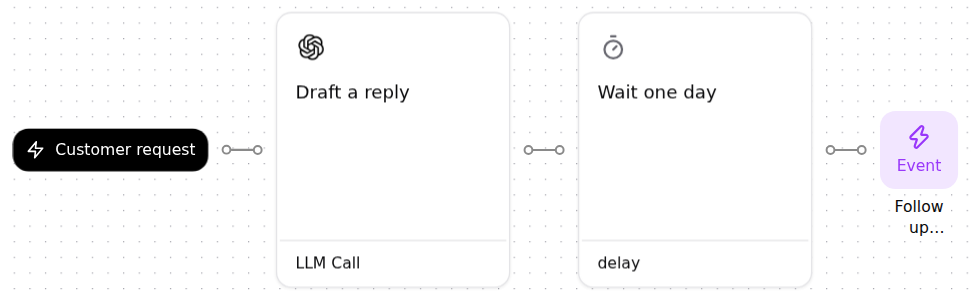
An example
Maya Chen emails Fjord Living about a cracked lamp shade. Email received starts the first job, which sorts the request with an LLM call and publishes its result. The next job waits for that event and drafts a reply that follows the Returns policy.
Draft, live, and paused
You build and change a workflow as a draft, test it, and choose Go live when it is ready. A live workflow runs on real events until you pause it.
- Draft
- A saved version for changes and tests. It does not react automatically to live events. Go live copies the branch to main and removes the merged draft.
- Live
- The published version. Matching events start its jobs, subject to their filters and resource access. Later edits belong to a draft until published.
- Paused
- The published configuration remains saved, but its jobs stop reacting automatically. Resuming uses the published version. Schedules resume from the current time rather than replaying missed starts.
Saved versions record the configuration at that point. Restoring a version changes what will run next. It does not undo messages, database writes, or other effects from earlier runs.
Runs
Run workflow tests the draft with a chosen event, and its Permissions decide which effects happen for real. Each run records what every job did. Runs explains run types, permissions and statuses, and Logs explains how to read one run.