All videos
Workflows · 2:31
What a workflow is
How jobs connect through events, run in parallel paths and branches, and pass values on.
Transcript
0:01Welcome
This video puts the parts of a workflow together, from the first event to every path it takes.
0:08Jobs and events
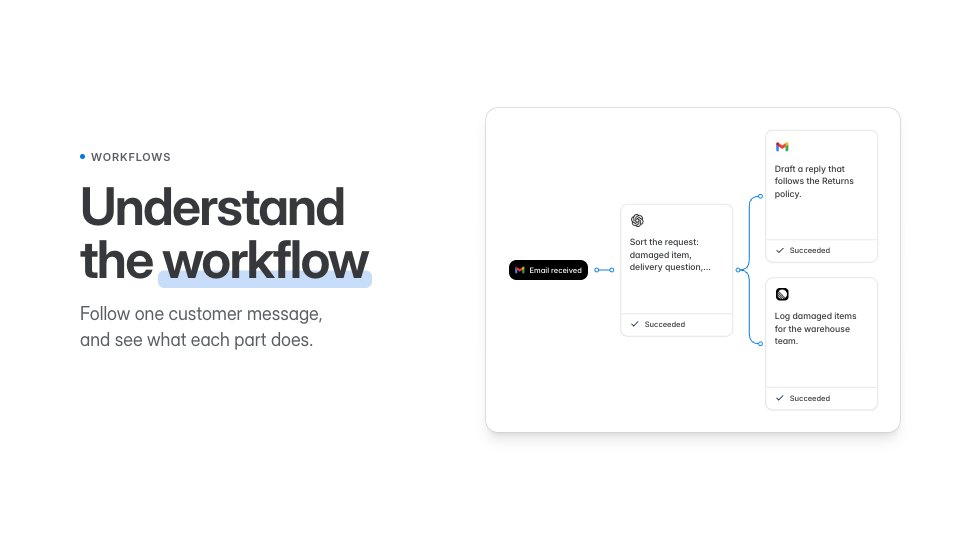
A workflow is a set of jobs on one canvas, connected through events. An event starts it. Maya's email arrives as Email received, the event type the first job waits for. The job checks its Filters and runs its action. Here, an LLM call finds the order number. Then it publishes an output event, Request read, and the jobs listening for it start next.
0:35Parallel paths
Several jobs can listen for the same event. Two jobs here wait for Request read. When it arrives, both start and run side by side. One event has started two parallel paths. One path drafts a reply to Maya. The other decides where her request goes.
0:54Choosing a path
To choose a path, this workflow uses a Decision. It answers one question, refund or delivery. The Decision publishes its answer on an event. Each job after it checks that answer with its own Filters. Maya's lamp shade arrived cracked, so the answer is refund. The delivery job shows Filters not met. When Jonas asks where his order is, the delivery path runs instead.
1:21Values travel on events
A job only sees the event that started it. The refund job never sees Maya's email, only the Decision's event. So a value that a later job needs has to travel on the output events. Each job here passes on the order number, 4821, so the refund message can name the order.
1:42Workflow to workflow
An output event can also start another workflow. The refund path ends by publishing Refund requested. A second workflow, Refunds, listens for that event, and starts when it arrives. In a test run, that only happens when Publish Events is on in Permissions.
2:01Draft, live and runs
You edit a workflow as a draft, and a draft does not react to real events. Go live publishes the draft. From then on, each matching event starts the live version. Every pass through it is a run, and Logs shows what each job did. Now you can read a workflow as events and jobs, and see where it splits, branches and hands off. The Workflows page in the docs goes deeper.