Docs / Databases / Query and write data
Query and write data
Read and change rows from TypeScript, workflow actions or SQL, and call functions with rpc(). Bind values as parameters and export complete SELECT results as CSV.
Query from TypeScript
The query builder in @oaiz/sdk reads and writes rows through the OAIZ API. Choose a table with from(), then select columns, filter rows, and set a result limit. It uses the same database grants and row rules as other database operations.
This server-side example reads up to 20 open deals, ordered by amount. It assumes a deals table with id, name, amount, and stage columns. Set OAIZ_API_KEY and OAIZ_DATABASE_ID in your server environment. The account behind the API key needs View access to the database.
import { createClient } from '@oaiz/sdk'

const key = process.env.OAIZ_API_KEY
const database = process.env.OAIZ_DATABASE_ID
if (!key || !database) {
  throw new Error('Set OAIZ_API_KEY and OAIZ_DATABASE_ID')
}

const db = createClient({
  url: 'https://api.oaiz.io',
  key,
  database,
})

const { data: deals, error } = await db
  .from('deals')
  .select('id, name, amount')
  .eq('stage', 'open')
  .order('amount', { ascending: false })
  .limit(20)

if (error) throw new Error(error.message)
console.log(deals)
Check error before using the returned data. This update uses the same client and requires Edit access. Replace the example ID with the deal’s ID. The filter selects that record, and select() returns it after the change. single() expects exactly one row.
const { data: updated, error: updateError } = await db
  .from('deals')
  .update({ stage: 'won' })
  .eq('id', '7c1e4a2b-3d5f-4e6a-9b8c-0d1e2f3a4b5c')
  .select('id, stage')
  .single()

if (updateError) throw new Error(updateError.message)
console.log(updated)For TypeScript checks against your schema, generate a Database type with the OAIZ CLI. Replace DATABASE_ID with your database ID. Import the generated type and pass it to createClient<Database>() to check table, view, and function names, columns, arguments, and values while you write code. The type lists views under Views, with every column nullable, and functions under Functions, with their arguments and return values.
Extension columns get TypeScript types too. A citext, ltree, lquery, ltxtquery, vector, halfvec, or sparsevec column is a string, and a vector value reads and writes as text such as [0.1,0.2,0.3]. An hstore column reads as a Record<string, string | null>, and an insert or update takes its text form, such as "tier"=>"gold", as a string. A type of the same name that you define in the data schema stays unknown, because the generator does not know its shape.
oaiz db types DATABASE_ID -o src/database.tsCall a function from TypeScript
rpc() calls a function in the data schema by name, with its arguments by name. An argument with a default can be left out. rpc() calls functions whose inputs are all named, non-variadic and of concrete types. Other functions are left out of generated types and refused with storage-function-call-invalid. The result is the value the function returned, a row as an object, an array for a function that returns a set, or null for a function that returns void.
This example adds a task through the add_task function and then reads the open_tasks view, both created in Schema and migrations. database() returns the same client on another database. Replace the example ID with your database ID.
const tasks = db.database('3f2a9c1e-7b4d-4e8a-9c6f-1a2b3c4d5e6f')

const { data: taskId, error: addError } = await tasks.rpc('add_task', {
  p_title: 'Send the quote',
})
if (addError) throw new Error(addError.message)

const { data: open, error: readError } = await tasks
  .from('open_tasks')
  .select('id, title')
  .order('id')

if (readError) throw new Error(readError.message)
console.log(taskId, open)
A VOLATILE function needs Edit access. A STABLE or IMMUTABLE function runs read only and needs View access. PostgreSQL refuses a write inside a read-only call, so a STABLE function that changes rows fails and leaves no change. A call follows the SQL limits. It stops after 30 seconds, returns at most 1,000 rows, and takes at most 100 arguments.
- storage-function-not-found
- The database holds no function with that name that rpc() can call. This includes trigger functions, names that start with _, and functions outside the data schema.
- storage-function-call-invalid
- The arguments do not match the function, for example an unknown argument or a missing argument without a default.
- storage-database-edit-required
- An account or app with View access called a VOLATILE function.
- storage-function-result-too-large
- The function returned more than 1,000 rows.
- storage-table-response-too-large
- The result is larger than 8 MiB, and the call’s changes roll back.
- storage-statement-timeout
- The call ran past the 30-second limit. OAIZ answers with HTTP 503, and the call’s changes roll back.
SQL and workflow actions
Query Database and Write to Database follow the statement rules on this page. A workflow read accepts one SELECT. A write accepts one INSERT, UPDATE, or DELETE. Parameters bind incoming values to $1, $2, and later placeholders. PostgreSQL checks their types. A value is not pasted into the SQL text.
Query Database returns rows to the job. Write to Database commits row changes and can return values through RETURNING. Committed writes also produce events that jobs can listen for. A statement in either action can call a function in the data schema by its qualified name, such as data.score(amount). Query Database runs one SELECT, read only, so a function called from it cannot change rows. Write to Database runs one INSERT, UPDATE, or DELETE, so a function that changes rows runs only inside such a statement. A SELECT that only calls the function does not run as a write. An app calls it with rpc().
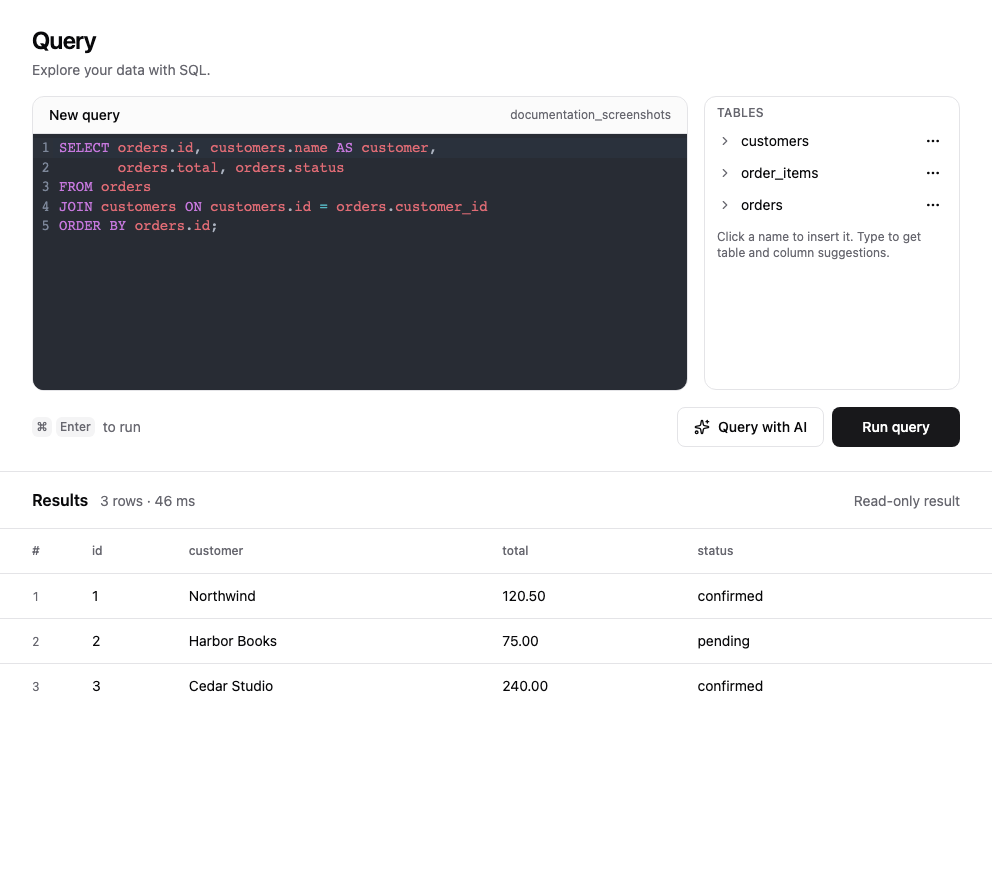
Statement rules
A query is one SELECT, including a join, an ordinary function, a subquery, a read-only WITH, TABLE or VALUES. A database Owner can also EXPLAIN a SELECT on the query endpoint. A write is one INSERT, UPDATE or DELETE, including INSERT SELECT, ON CONFLICT, and a WITH statement that changes rows. Placeholders run from $1 with no gap, and each one has one bound value. A restricted numeric SET LOCAL prefix can precede the one main statement. Separate calls are separate transactions. The schema view is where you read policies. OAIZ grants are where you share the database.
| Operation | Result | Working form |
|---|---|---|
| DDL, TRUNCATE, MERGE, a session command outside the supported numeric SET LOCAL prefix, a transaction command, a write sent as a query, or a query sent as a write | Refused. The query endpoint says a query is one select or explain of select. A workflow query or database tool names the statement and says a query is one select. A write names the statement and says a write is one insert, update, or delete. | Use the matching operation. Run supported DDL and TRUNCATE as an Owner migration. MERGE is not available. A database Owner can EXPLAIN a SELECT on the query endpoint. Use INSERT ON CONFLICT for an upsert that fits one INSERT. Extensions and performance lists the five permitted numeric SET LOCAL settings. |
| More than one statement | Refused. The message says the call holds that many statements, and a query or write is one. | Use one statement, or a modifying WITH on a write when the changes belong together. Separate calls do not share a transaction. |
| A query whose WITH changes rows, or SELECT INTO | Refused because the query changes rows, or because it uses SELECT INTO. | Put the modifying WITH on a write. Create the table in a migration, then INSERT SELECT on a write. |
| set_config, query_to_xml, query_to_xmlschema, query_to_xml_and_xmlschema, ts_stat or ts_rewrite | Refused. The message says the statement calls that function. | Bind values. The acting account supplies the identity. A session override is unavailable. |
| pg_advisory_lock, pg_advisory_lock_shared, pg_try_advisory_lock or pg_try_advisory_lock_shared | Refused. The message says the statement calls that function. | A transaction-scoped lock such as pg_advisory_xact_lock remains available and ends with the transaction. |
| Large-object functions, including lo_*, loread and lowrite | Refused. | Store values in ordinary columns. The large-object API is not available, because that storage sits outside row policies and row events. |
| pg_settings | Refused, including a read. | Reading or changing pg_settings is unavailable. Use the supported SET LOCAL lines before a query or write. |
| A catalogue or statistic for the whole cluster, including roles, other databases, replication, locks and pg_stat_progress_* | Refused. The message says the name describes the whole cluster rather than this database. Database-local catalogues stay readable, including pg_stat_user_tables. | Query this database. Other databases, roles and sessions are outside the statement. |
| A cluster lookup such as pg_stat_get_*, has_*_privilege, regrole or aclitem | Refused. The message says the call or type looks up the whole cluster. | Cross-cluster lookup is unavailable. |
| pg_policy or pg_policies | Refused. The message says to read row access policies from the database schema. | Use the schema view in OAIZ. |
| A missing placeholder, or a parameter count other than the highest placeholder | Refused before PostgreSQL runs the statement. | Bind one value for each placeholder from $1 with no gap. |
| Empty SQL, a NUL byte, SQL over 256 KiB, parameter JSON over 8 MiB, or more than 65,535 parameters | Refused. | Shorten the statement or the values. |
| Two returned columns with the same name on a write | PostgreSQL runs the statement, then OAIZ refuses the result. The message says it returns two columns with the same name. A write rolls back. | Give each column its own alias. |
| More than 1,000 returned rows | The result is truncated and the statement still finishes. A write is not rolled back for this reason. | Export CSV to download the complete SELECT result. |
| A returned cell over 1 MiB, or a result over 8 MiB | Refused. A write that returns such a result rolls back. | Return fewer or smaller values. |
Delete the acting account’s rows
This statement deletes from the customers table in the acting-account rules. It removes the rows those rules allow and records a row event. An account with View cannot delete, and the rows stay. On the write path a workflow uses, PostgreSQL refuses that delete and the message includes SQLSTATE 42501. An account with Edit deletes its own rows.
DELETE FROM customers
WHERE owner_id = (SELECT oaiz_private.oaiz_subject())Export CSV
The OAIZ CLI downloads a whole table or the complete result of one SELECT as CSV. The account needs View access. Database grants and row rules determine which rows it can export.
oaiz db export DATABASE_ID --table orders -o orders.csv

oaiz db export DATABASE_ID --sql 'SELECT id, total FROM data.orders WHERE status = $1 ORDER BY id' --params '["paid"]' -o paid-orders.csv
Choose either --table or --sql and supply -o for the output. Table names refer to the data schema. Use --yes to replace an existing file. The CLI writes beside the destination and publishes the file only after it verifies that the download finished. A failed download removes its temporary file and preserves an existing destination.
Set the output to a single dash to send CSV to standard output. Diagnostics go to standard error. If an export fails, standard output can contain partial CSV and the command exits with an error. Run the command again after an interruption.
Exports have a ten-minute timeout and allow two concurrent exports per database. A third is refused until one ends. Ordinary queries keep their own limits. Export has no total row or file size limit, but a single PostgreSQL result row must fit within 8 MiB. SQL admission is the same as a read query. Writes, multiple statements and EXPLAIN are refused.
CSV uses UTF-8 without a byte order mark, CRLF record endings and one header row. Values keep their PostgreSQL text representation. NULL is an unquoted empty cell. Empty text is two quote characters (""). A value containing a comma, quote or line break is quoted, with embedded quotes doubled.