Docs / Workflows / Actions / Human approval
Human approval
Hold a proposed output event for a person to review. Approval publishes the reviewed values so later jobs can run.
Review the proposed output
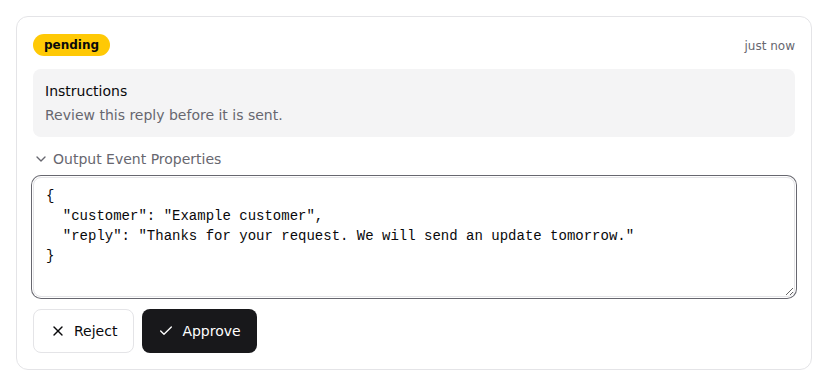
The action prepares the job’s output event, then holds it instead of publishing it. Approval instructions can include incoming values such as {{ properties.reply }}. A person decides the request in Approvals.
Approve publishes the held event, with any edits the reviewer made to its properties. Reject ends this action without publishing it. Approvals explains how requests are reviewed, edited and decided.
Who can decide
Anyone with View access to the workflow can decide its requests, so restricting workflow access restricts the reviewers. Approvals describes who sees which requests. Human approval is available when enabled for the organisation.
Review a reply before sending
For example, an LLM call prepares a reply, Human approval holds an output event containing reply and recipient, and an integration action sends the approved text. The reviewer can correct reply while leaving recipient unchanged.
{
  "recipient": "customer@example.com",
  "reply": "Your refund has been approved and will be processed today."
}
Place the approval before the action that needs permission. It cannot undo a message already sent or another change made by an earlier job.
Automatic decisions and timeouts
- Auto-Approval Conditions
- Conditions on the incoming event approve the request without a person when they match. For example, a policy can automatically approve requests below a known amount.
- No timeout
- Keeps the request pending until a person approves or rejects it.
- Auto-approve on timeout
- Publishes the proposed event after the configured duration, without a person’s decision.
- Auto-reject on timeout
- Ends the action after the configured duration without publishing the proposed event.
The timeout starts when the request is created. Test runs always auto-approve this action. A passing test checks the following jobs but does not establish that a person approved the proposal.