Docs / Workflows / Actions / Agent
Agent
Give a model a task and selected tools. It reads the input, calls tools when needed and uses their results to produce an answer.
How the work runs
An agent works in rounds. The model receives the task and available tool definitions, then chooses whether to answer or call a tool. Tool results return to the model for its next round. A round can contain several tool calls.
Use an Agent when the task needs information beyond the supplied input or needs to choose among available actions. LLM call handles one model request without tools. The tools selected for an Agent determine the external work it can attempt.
The input and context
- prompt
- The task given to the model. References such as {{ properties.company }} insert values from the incoming event.
- eventContext
- full adds the incoming event as context. tagged supplies only the event values referenced in the prompt. Attached knowledge provides saved document content separately.
- includeFiles
- Includes selected event files. Filename and type filters narrow the selection. The model reads formats it supports, and available parsing tools can process other files supplied to the run.
Files from the event and attached knowledge can also be made available to tools that handle those files. File access does not give a tool access to unrelated stored files.
Model, prompt, tools and skills
Model & prompt settings, beside the prompt in the job’s Action section, opens the same dialog as an LLM call. Its Model & prompt tab has the same Prompt, Knowledge documents, Model, Reasoning effort, Temperature and Timeout, plus Max iterations, the round limit described below. Three more tabs, each with a count, choose the tools and skills.
- Native tools
- OAIZ tools such as web search, knowledge and event tools. Storage Query and Storage Execute each need their databases chosen, and Event Create needs the event types it is allowed to publish.
- Integration tools
- Actions from your integrations, each tied to one connection.
- Skills
- Instructions from the OAIZ skill catalog, appended after the prompt when the job runs.
Tools and permissions
Native tools provide OAIZ capabilities such as web search. Integration tools select a connection and one of its actions. For example, a customer lookup and a customer update are distinct calls, even when they use the same connection.
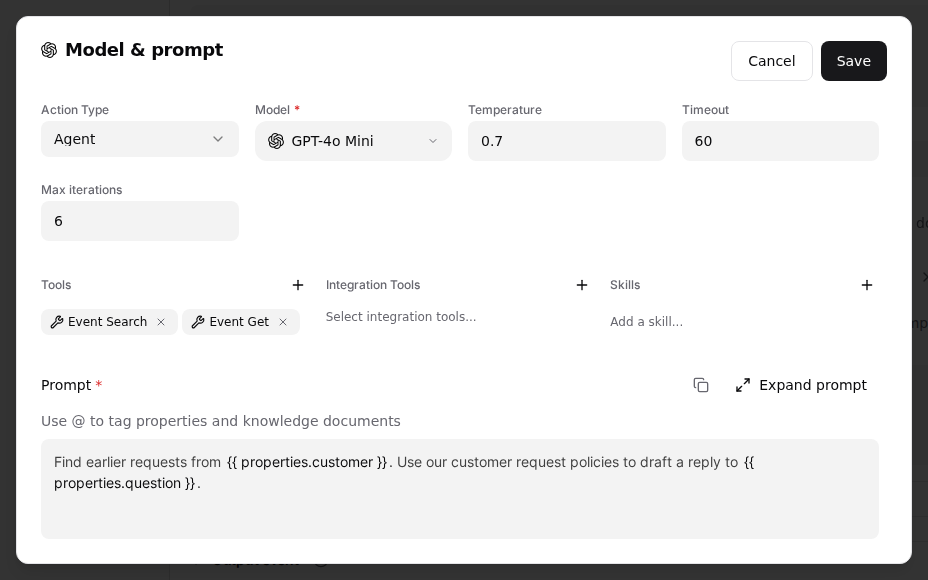
Knowledge, database and integration calls use the job account’s grants. Storage Query and Storage Execute work only on the databases chosen for each tool. A call to another database is refused. Event Create publishes only the event types listed for the job, either one type or every type of a custom provider. Integration tools are also limited to the selected connection and action, with the run’s read and write settings. A person’s connection-share restrictions are separate from these job settings.
Tests still call the model. Integration reads and writes follow the run’s permissions. Tools that change knowledge documents follow the Write permission, and tools that create events follow Publish Events. Other native tools still run and can make changes.
A company lookup
This configuration uses the company property from an incoming event and the native web-search tool. It declares two string results rather than relying on a paragraph that a later job must interpret.
{
  "prompt": "Find the website for {{ properties.company }} and return a short description with its source URL.",
  "llm": "openai/gpt-6-luna",
  "tools": [
    "firecrawl_search"
  ],
  "maxIterations": 5,
  "eventContext": "tagged",
  "outputSchema": {
    "summary": {
      "type": "string"
    },
    "sourceUrl": {
      "type": "string"
    }
  }
}
The model ID selects the model for this job. Other models have their own supported temperature and reasoning settings. Tool availability still applies to the selected search tool.
The returned result
outputSchema names the values the agent must return. Those results are available under action.*, but they reach later jobs only through the job’s output event. Files produced by supported tools can also be attached to that event.
{
  "eventTypeIdentifier": "e:example/company-summary",
  "properties": {
    "summary": "{{ action.summary }}",
    "sourceUrl": "{{ action.sourceUrl }}"
  }
}
For this example, the next job receives summary and sourceUrl. Declaring these fields gives the workflow a named result to use. It does not verify that the source is correct.
Rounds, timeouts and failures
maxIterations allows 1 to 100 rounds. The final round is reserved for the answer, so information gathering must finish before it. The job timeout also limits the run.
Reaching a limit without a final answer fails the action. A limit is not a promise that the task finishes, and raising it permits more model and tool work. Execution records show the calls and results that occurred before completion or failure.