Docs / Administration / Bring your own key
Bring your own key
Run supported OpenAI and Anthropic models on your organisation’s own provider accounts. Manage model permissions, choose accounts for AI features and track spend on your keys.
An administrator saves a named OpenAI or Anthropic API key. Supported models on that account become choices alongside models on OAIZ. A model choice includes the account it runs on. Your provider bills requests on your key to your account. OAIZ charges nothing for those requests.
Bring your own key must be enabled for your OAIZ organisation. Only organisation administrators can add, check, rename, replace and remove keys and change which models run where. The settings are under Settings, Organisation, Models.
The screenshots on this page show an OpenAI key and specific model selections as examples.
Provider keys
The Keys tab lists the organisation’s provider keys. In Add key, select Anthropic, enter a key name and API key, then add it. Anthropic uses its global API and has no EU endpoint in OAIZ. OpenAI alone has an endpoint choice. Choose EU for a key from an OpenAI project with EU data residency, and Global for other OpenAI keys. Model pickers can show the key’s name.
Anthropic keys support the direct Anthropic Claude models in OAIZ’s catalogue, including the Opus, Sonnet, Haiku and Fable families. Your Anthropic account must permit the selected model and have provider credit available.
Adding, checking or replacing an Anthropic key makes one small request to Claude Haiku 4.5. OpenAI keys also use a single model probe. An add or replacement saves only after the probe succeeds. A failed check displays the error. A successful check proves access to the probe model. The result list contains OAIZ catalogue models for that provider. It does not verify access to every listed model.

OAIZ never shows the full saved secret again. The list shows the key’s name, a hint from its start and end, its provider, its OpenAI endpoint where applicable, its status, its last successful check and supported models. The actions menu offers Check now, rename, Replace secret and remove. Replacing the secret keeps the key’s identity, name and saved model/account selections.
When OAIZ records a provider refusal during use of a saved key, it can send a key-failure email for invalid credentials, missing model access, exhausted provider credit or a provider spend limit. Detection does not cover every failure path. Ordinary rate limits, provider outages and failed Add key, Check now or Replace secret probes do not trigger this email.
The email goes to the person who originally added the key. If that person’s contact is unavailable, OAIZ uses the first usable billing-contact email. Repeated notifications for the same stored key are suppressed for 24 hours across failure reasons. Checking, renaming or replacing its secret does not reset that cooldown.
- A check fails
- Read the reason in the Keys tab, repair the key or provider account, then check it again. Another option is to select a usable model/account in the affected chat, job or feature setting. Enabling another account in Enable Models does not change saved selections. An explicit own-key choice has no backup model or account.
- A key is removed
- Chats and jobs that use a model on that key stop working until someone picks another account for them.
Where each model runs
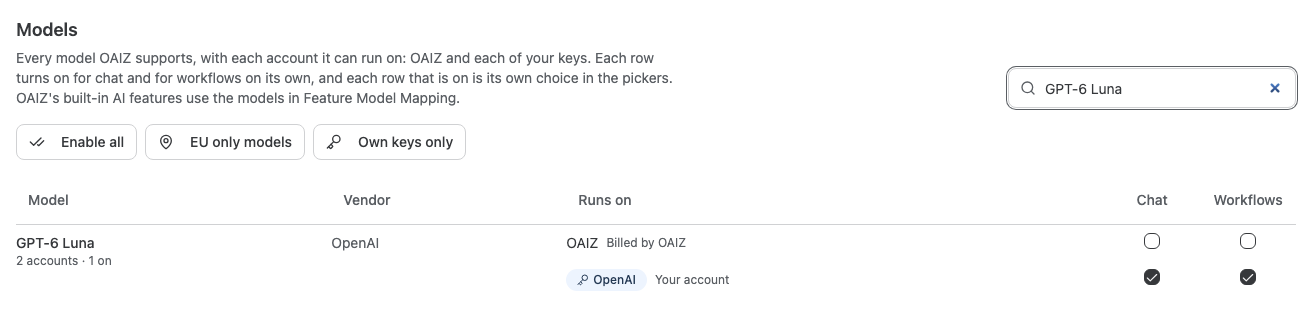
Enable Models lists OAIZ catalogue models and decision models with each supported account: OAIZ, billed by OAIZ, and your keys, shown as Your account. Each row has separate Chat, Workflows and Decisions permissions, and a dash marks one that does not apply to that model or account. Jev and Clef-Flash make decisions only on OAIZ. GPT-6 Luna can also make decisions on an OpenAI key. Enabled rows become choices in the model pickers. A newly added key enables its supported models for all three.
Each preset immediately saves changes to the entire Enable Models list for Chat, Workflows and Decisions, including rows hidden by the search filter.
- Enable all
- Enables every OAIZ row and every supported model on each organisation key. It clears restrictions on key rows.
- EU only models
- Enables only OAIZ models tagged for EU processing, such as the Clef-Flash decision model, and models on OpenAI EU-endpoint keys. It disables global OpenAI-key rows and all Anthropic-key rows.
- Own keys only
- Disables every OAIZ row, including the Jev and Clef-Flash decision models, and enables every supported model on each organisation key, with key restrictions cleared. This preset requires a saved key account.
Presets leave saved feature mappings and user/team grants in place. The resulting permissions remain editable. A Decision job or AI feature that uses a disabled decision model, including one that inherits the organisation default, does not run until it uses a permitted model. A preset does not route all AI traffic or establish a processing region for every feature.
Models for OAIZ’s AI features
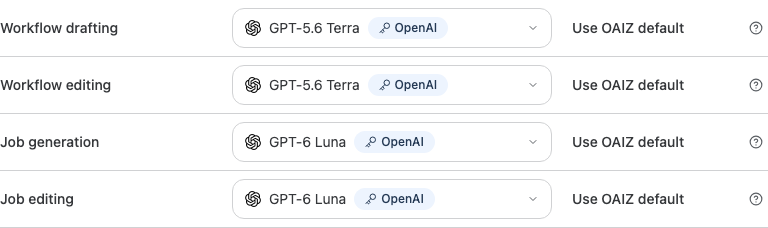
Feature Model Mapping sets models for OAIZ features such as workflow drafting, job repair and chat compaction. Choices from the model catalogue follow the organisation’s Chat permissions for the selected account. An explicit choice uses that model/account with no backup. Unchanged defaults can retain their existing backup behavior. A refused choice needs a permitted replacement before it can run.
Live voice, transcription, image generation and embeddings have their own compatible provider options. For embeddings the choice sets only the account, and each call names its embedding model. Anthropic keys cannot serve as accounts for these features.
For Chat quality, Default uses the OAIZ-funded judge and Off disables evaluation. A custom model requires an organisation key and follows Chat policy. Presets do not move or disable Default.
If a catalogue feature’s choice is no longer permitted, OAIZ suggests a replacement when one is available. An administrator applies a suggestion or the bulk switch to permitted models. Features with their own provider options are excluded from these suggestions. OAIZ looks for the closest model in this order.
- The same model on another account
- GPT-5.6 Terra on OAIZ becomes GPT-5.6 Terra on your key.
- The newest release of the same line
- A model with the same name and a version at least as new as the one it replaces.
- The nearest model
- The closest permitted model in intelligence, cost and speed among OAIZ’s preferred models. If none are permitted, the search includes all permitted models.
Chat and workflows
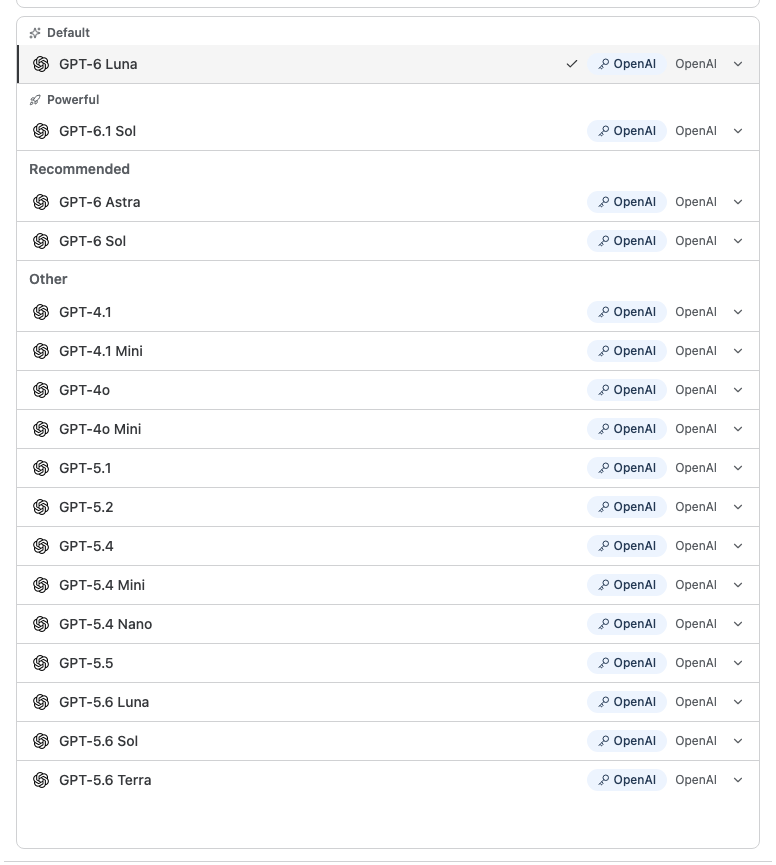
The model picker in chat offers the models permitted for chat, and a model that runs on a key carries the key’s name. A chat that does not pick a model uses the Default chat model from Feature Model Mapping.
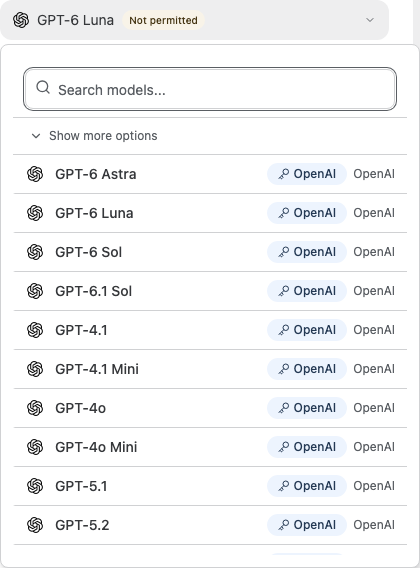
LLM Call, Agent and Code jobs choose from the models permitted for workflows. A job that still uses a model that is no longer permitted shows Not permitted on its model field, and its picker offers the permitted models on each account.
Usage and spend limits
Usage cost is what OAIZ bills. On your keys is OAIZ’s calculation of spend at provider prices, converted to your billing currency. It is not reconciled with provider invoices. Group by Key splits the spend by key.
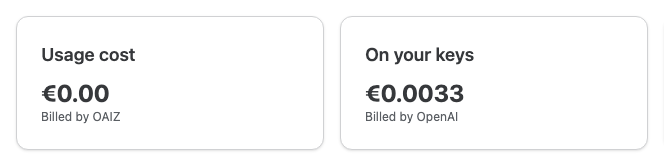
A request on your key has an OAIZ cost of 0.00 alongside its calculated provider spend. In Usage, administrators see key names. Other members see Your organisation’s key plus the last four identifier characters in key breakdowns, and Your organisation’s account in individual entries.

Spend limits still apply on your keys. A limit on a person or a workflow counts the spend on your keys at the provider’s price, together with what OAIZ bills, so a workflow that runs on your key stops at its limit.
