All videos
Start here · 2:06
What can you do with OAIZ
What OAIZ does, and how to choose the first task to hand over.
Transcript
0:01Welcome
This short video shows what OAIZ can do for your business, and how to choose the first task to hand over to it.
0:08Events start work
Think about the work that arrives in your day. An email from a customer. A new file in a shared folder. A weekly meeting on the calendar. In OAIZ, each of these is an event. An event means that something happened. A workflow is a set of steps that starts when an event arrives. It does the work you would otherwise do by hand.
0:31An example
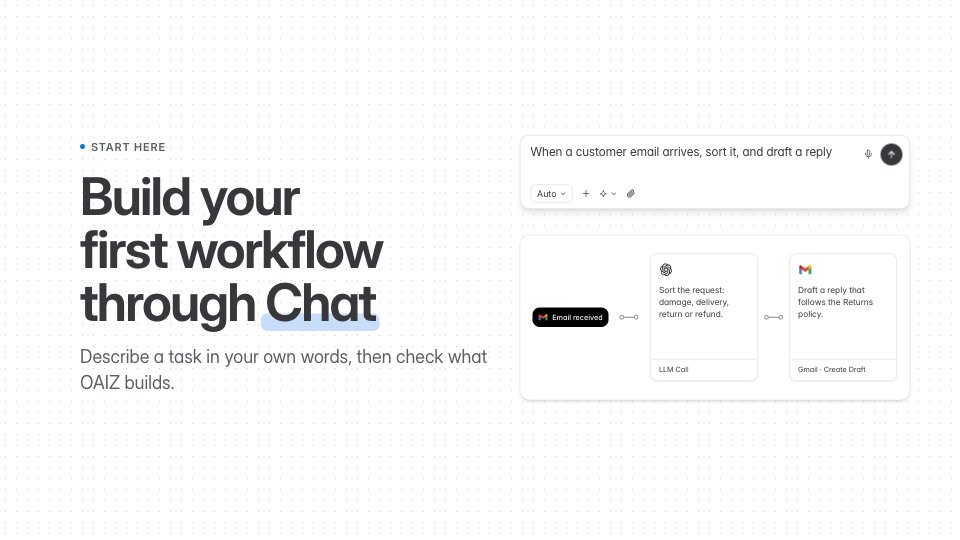
Here is an example. A customer writes in about a damaged order. OAIZ reads the message, sorts it as a damaged item, and drafts a reply that follows your returns policy. A person on your team checks the draft, and sends it with one click.
0:48More examples
The same idea works across a business. Prepare a weekly report every Monday morning, from the numbers in your tools. Turn invoices and forms into organised records, without typing them in. Follow up with a customer who has not replied after three days. And send each incoming request to the right person on your team.
1:11Where things are
OAIZ has four main places, in the menu on the left. Chat is where you describe the work, and where OAIZ builds and changes your workflows. Library holds your workflows and your knowledge documents. Activity shows every run and every event, across all your workflows. Integrations holds the accounts you connected, like your email or your team chat.
1:38Choose your first task
Here is how to choose your first task. Pick something you do often, and in the same way each time. It should start from something clear, like an email arriving, or a set time each week. You should know what a good result looks like, so you can check it. And keep the decisions that need your judgement. OAIZ can prepare the work, and ask you before anything important happens.