All videos
Runs and logs · 2:40
What runs and logs show
What a run is, the statuses a run shows, test runs and live runs, and how Logs help you find why something did not work.
Transcript
0:01Welcome
OAIZ records each pass of a workflow as a run. This video shows how to read runs in Logs.
0:08One event, one run
Maya Chen emails about a cracked lamp shade. Her email is an event, and it starts the first job. Each job publishes an output event, and the jobs listening for it continue the run. Everything that one email started is one run. Jonas Berg's email starts a run of its own.
0:29Run statuses
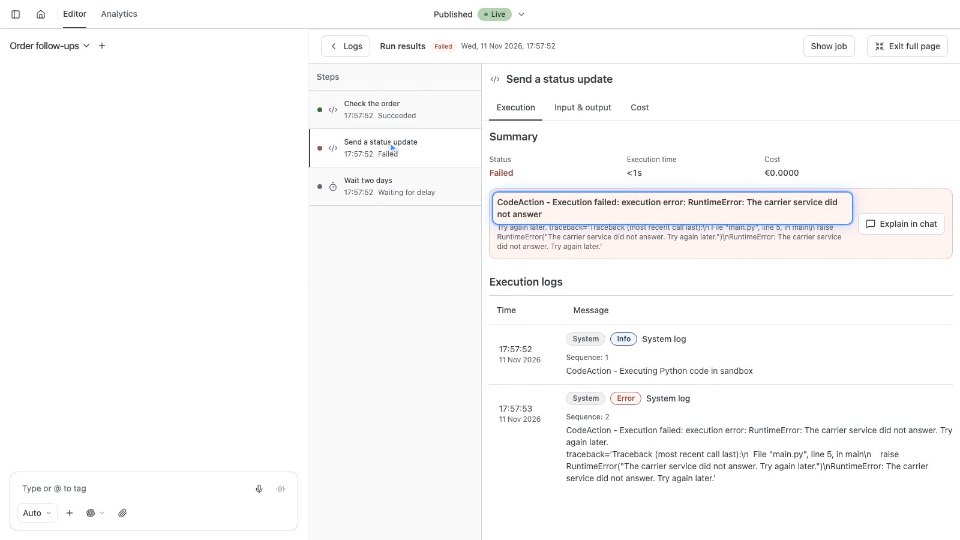
As a run reaches each job, the job shows a status. Succeeded means its action finished. Failed means the action returned an error. Filters not met means the event did not pass the job's Filters. That is not an error. Did not run means no event reached the job, for example because an earlier job failed. Waiting for approval means the run is holding until a person decides. Any failed job makes the run Failed. Paths that Filters stopped do not, so Succeeded does not mean every job ran.
1:05Test runs and live runs
Run workflow on a draft starts a test run. Write starts off, so it sends nothing. LLM calls still run in a test, so you read real answers. Once the workflow is live, each matching email starts a Triggered run that acts for real.
1:24What Logs record
Logs, beside Run workflow, lists each run with its status, a summary, the duration and the cost. Open Maya's run. Steps lists each job with its own status. Input & output shows the event a job received and the event it published. The Cost tab shows the job's cost, tokens and model calls. On the failed job, the Execution tab gives the error and the call that failed.
1:53Find why and re-run
Compare the events. Maya's address came in, but the first job did not pass it on. Explain in chat gives Chat the job, its log and its input, and asks why it failed. Ask Chat to fix the first job. Test the draft, then choose Go live. Then choose Re-run step on that job. It runs with Maya's original email and the live fix. A re-run acts for real, so the jobs after it run too, and this time the reply is drafted.
2:26What you can now do
You can now read any run, see how each job went, and find where it stopped. The docs pages Runs and Logs cover every status and setting.