All videos
Apps · 2:16
Build an app on your data
Build a small web page on your data with Chat, publish it and share it with your team.
Transcript
0:01Welcome
This video explains what an OAIZ app is, and when to build one.
0:06A screen for your data
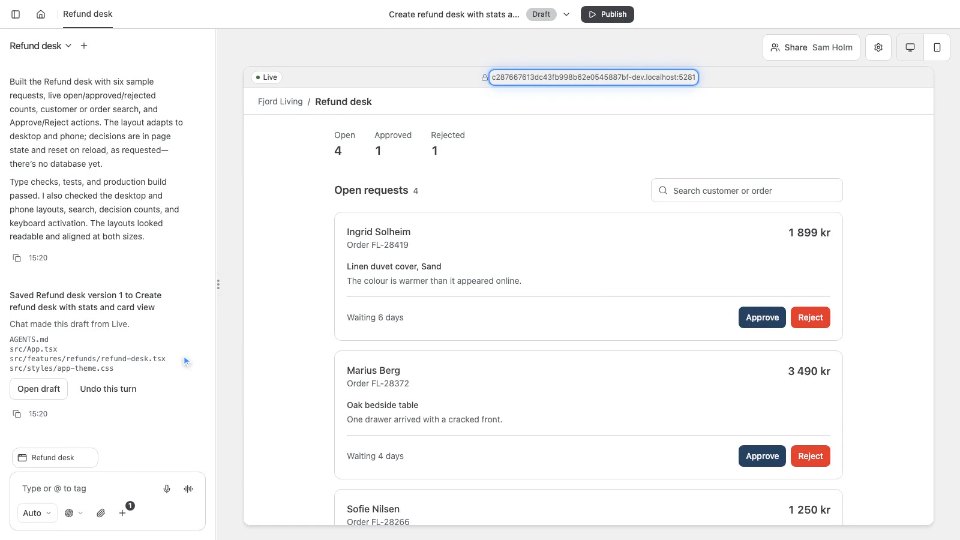
Fjord Living keeps refund requests in a database. Maya's request for order 4821 is one row. Every morning, Sam's team checks the open requests and approves them. They want one page that lists only the open requests, with an Approve button beside each. In OAIZ, that page is an app. It has its own web address, and it works with your OAIZ data.
0:32Build it in Chat
In the Library, New, then App, starts one from the OAIZ app starter. Sam calls it Refund approvals. The app opens with Chat beside a live preview. Sam describes the page in plain words. Chat changes the app's files, and the preview shows the result. Each turn saves a version in a draft. People who use the app see none of it until Sam publishes.
0:58The app's own access
An app reaches only what is shared with it. In Settings, Sam adds the Refund requests database. Read only lets the app show rows. Read and change also lets it update them, so the Approve button can work. Everyone who uses the app works through the app's own access. Their personal access does not count here.
1:20Publish and share
When the draft looks right, Publish makes it live at the app's address. Share decides who can use it. Sam gives the support team Can use. A teammate opens the address and signs in with OAIZ. Only people in your organisation who can use the app get in.
1:38A workflow follows
Next morning, Sam approves Maya's refund. The app sets the row's status to approved. Like any saved change to a table, that publishes a Rows changed event. A live workflow listens for it, and drafts the refund email to Maya.
1:56When to build an app
Build an app when a workflow or a table needs a screen of its own. A list to review, a form to fill in, or a button that starts work. You can now tell when a page on your data is worth building. To go deeper, read the Apps page in the docs.