All videos
Administration · 2:52
How OAIZ keeps your organisation safe
Where your data is processed, two-factor sign-in, API keys, where models run and using your own model key.
Transcript
0:01Welcome
This video explains what an administrator controls in OAIZ, and why each control is there.
0:07Your data and OAIZ
For personal data in your work, you are the data controller. OAIZ processes it for you, under the Data Processing Agreement. OAIZ's main application and storage run in Belgium. Where else data goes depends on the models, features and connected services you use. An Administrator manages the organisation's members, invitations and settings. Sharing decides who can use each workflow, and the platform videos explain it.
0:40Two-factor sign-in
Two-factor authentication adds a second check after the password, from an authenticator app, a passkey or a security key. Recovery codes are the backup. Each one works once. New organisations require it for Administrators, and an Administrator can require it for Everyone. An Administrator can also reset another person's factors.
1:04API keys
Scripts and other services use an API key instead of signing in. Each key belongs to a person or a service account, and uses that account's current access. A key never asks for a second factor, and its full value shows only once. Delete a key, and it stops working. Other keys and signed-in sessions carry on.
1:27Where models run
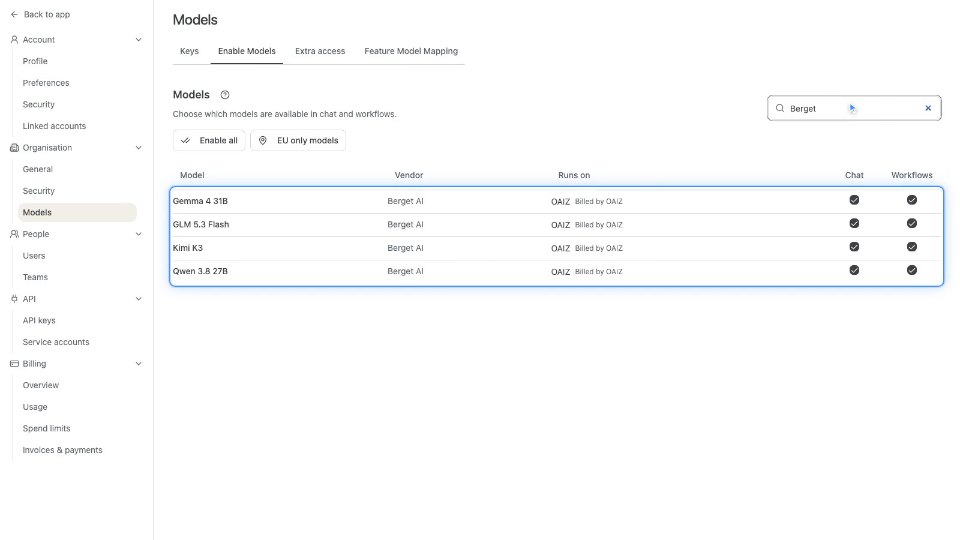
Each LLM call sends your prompt to a model provider. Where it is processed depends on the model. Berget AI runs four models inside the European Economic Area, and Mistral Large 4 uses Mistral's European endpoint. Other providers can process data outside it. In Models, an Administrator chooses which models Chat and workflows offer. EU only models keeps just the ones marked for EU processing. Processing details lists the model behind each AI feature, as a dated report.
2:03Your own key
With bring your own key turned on, an Administrator adds your OpenAI or Anthropic key, and OAIZ checks it before saving. Its models appear as Your account, beside the same models on OAIZ. Your provider bills those requests, and OAIZ charges nothing for them. Spend limits still count them, so a workflow on your key stops at its limit.
2:30What you control
Now you know where OAIZ processes your data, how people and programs sign in, and where your models run. The next videos show API keys, two-factor sign-in, model regions and your own key in the app. To go deeper, read the Security page in the docs.