All videos
Actions · 2:45
What actions a job can run
The actions a job can run, grouped the way the docs group them, with an example of each and when to choose an Agent over an LLM call.
Transcript
0:01Welcome
Every job in a workflow runs one action. This video shows the actions a job can run, and how to choose between them.
0:09One job, one action
An action is the work a job does. It reads the event that started the job, and returns a result. Each job card names its action along the bottom. In Customer requests, an LLM call sorts Maya's email, and a Decision routes it.
0:28LLM call or Agent
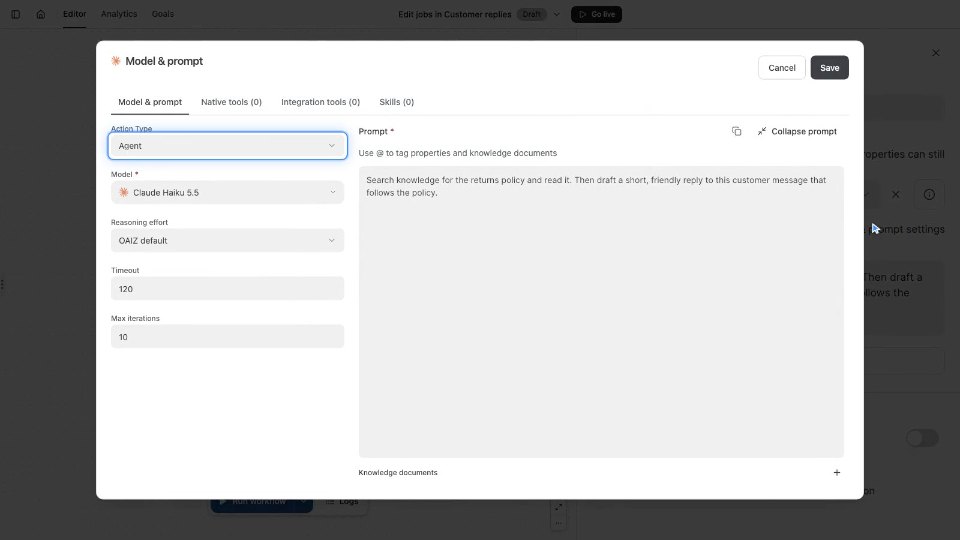
An LLM call sends one prompt to a model, with what the job gives it. From Maya's email, it returns the order number, 4821, and the problem, a cracked shade. An Agent works in rounds. Each round, the model answers, or calls the tools you selected. Its Storage Query tool finds Maya's earlier refund, on order 4612. Choose an LLM call when the event and attached knowledge hold everything the model needs. Choose an Agent when the job has to fetch more data, or take action in a connected service.
1:08Decisions, images and code
Decision answers typed questions, such as which kind of request a message is. It returns answers and probabilities, never written text. Image generation creates pictures from a prompt, and attaches the files to an event. Code execution runs Python, to add up an order total or build a CSV file.
1:29Time and approval
Schedule starts runs at set times, like a request summary every Monday at nine. Delay holds a job's output for a set time, so a follow-up reaches Maya three days later. Wait for event holds the run until a matching event arrives, or a deadline passes. Human approval holds a proposed output for a person. Sam checks the reply before it is sent.
1:55Records and other systems
Create knowledge and Update knowledge write documents, like a weekly summary of requests. Query database reads rows, and Write to database changes them, here adding a row for order 4821. Webhook sends an HTTP request to another system, like order 4821's status to the warehouse. An integration action runs one action in a connected account, such as a message to your team chat. Agent and Code execution jobs can call the same integration actions too.
2:28Reading a job's action
Each job's action tells you what kind of work it does. You can now tell when a job needs an LLM call, and when it needs an Agent. The Actions section of the docs has a page for every action.